slackzilla
Slackzilla Server Setup
Last updated: 09/10/2026
TOC
| Section | Description |
|---|---|
| Overview | Overview of the server setup process. |
| 1. Architecture | The architecture of the Slackzilla server. |
| 2. Requirements | The requirements for setting up the server. |
| 3. Install system packages and Node.js | Installing the necessary system packages and Node.js. |
| 4. Clone the repository | Cloning the Slackzilla repository. |
| 5. Configure environment files | Configuring the environment files for the server. |
| 6. Configure Nginx (if required) | Configuring Nginx for the server. |
| 7. Install and start the systemd services | Installing and starting the systemd services. |
| 8. Configure GitHub Actions secrets | Configuring GitHub Actions secrets for deployment. |
| 9. Verify the installation | Verifying the server installation. |
| 10. Normal deployment workflow | The normal workflow for deploying changes. |
| 11. Troubleshooting | Troubleshooting common issues. |
| Related documentation | Links to related documentation. |
Overview
This guide covers the one-time setup of a Slackzilla server. After setup, normal code changes should be committed and pushed to GitHub. The GitHub Actions workflow handles deployment; do not edit the production checkout directly.
1. Architecture
Slackzilla runs as two systemd services:
| Service | Entry point | Purpose |
|---|---|---|
slackzilla.service |
bot/bot.js |
Connects to Slack and runs the bot |
slackzilla-webhook.service |
server/server.js |
Serves the dashboard and API, and accepts deployment webhooks |
The Node server listens on port 9000 by default. The supplied Nginx configuration listens on port 80 and proxies requests to http://localhost:9000.
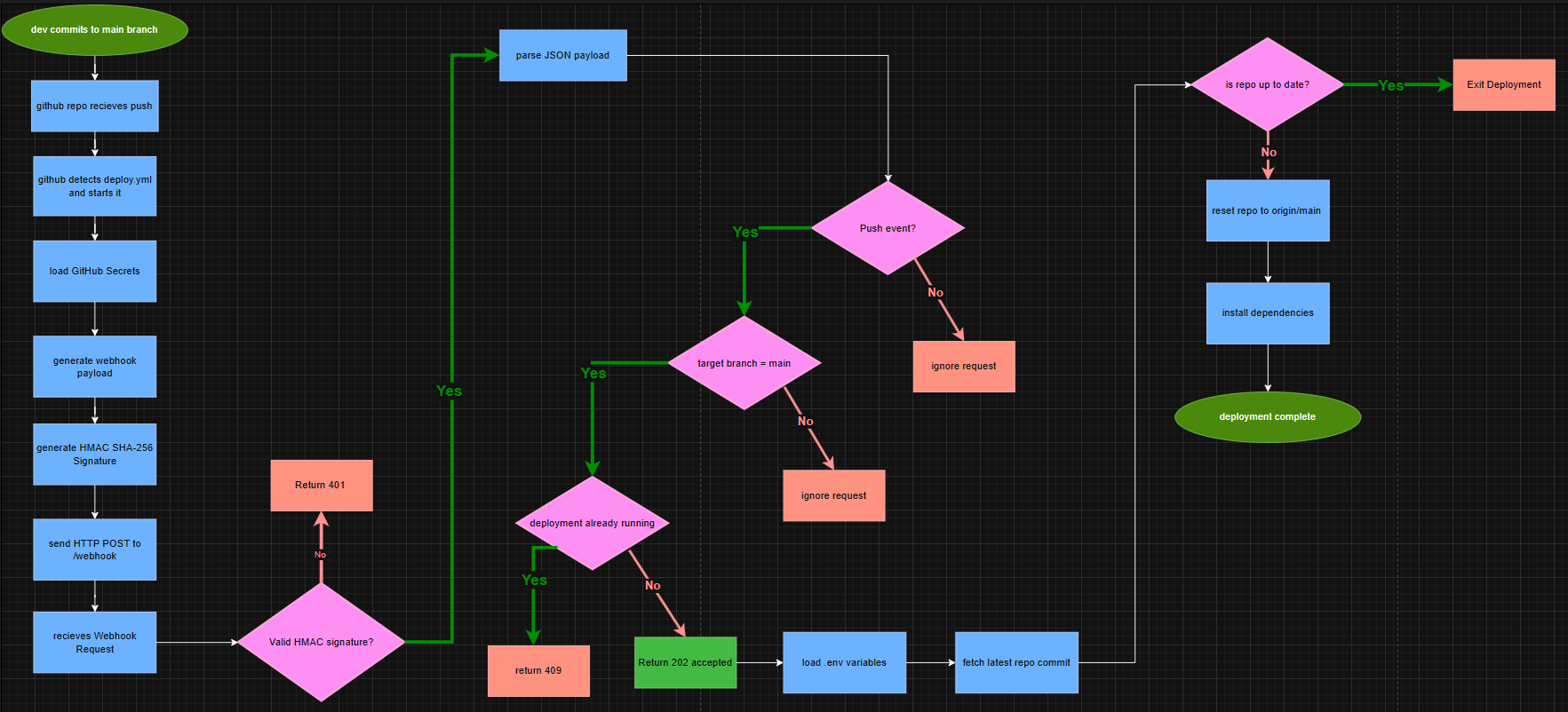
A successful webhook response (202 Accepted) means the deployment was accepted, not that the deployment has finished successfully. Check the admin dashboard or service logs for the final result.
2. Requirements
Use a Debian/Ubuntu Linux server with:
git,curl,ca-certificates,opensslandnginxif Nginx is part of the server’s routing setup- Node.js 22, matching the version used by the GitHub Actions workflow
- npm (bundled with Node.js)
systemd- A Git checkout of this repository
- A Slack app with its bot token, app-level token and signing secret
- Access to configure GitHub repository Actions secrets
- A public URL that can reach the server’s webhook endpoint
The systemd unit files currently run as root and use /root/projs/slackzilla as their working directory. The steps below use that path to match the supplied unit files. If you choose another location or user, update both unit files and the deployment configuration consistently.
3. Install system packages and Node.js
Install the system packages:
sudo apt update
sudo apt install -y git curl ca-certificates nano openssl nginx
Install Node.js 22 using your preferred trusted Node.js installation method. Confirm the versions:
node --version
npm --version
The Node.js version should be compatible with the project’s dependencies and should match the major version used by CI (22).
4. Clone the repository
The supplied systemd files expect the project at /root/projs/slackzilla. Create the checkout at that location, or change the service files and PROJECT_DIR if you use a different path.
For the supplied path:
sudo mkdir -p /root/projs
sudo git clone https://github.com/rylvion/slackzilla.git /root/projs/slackzilla
cd /root/projs/slackzilla
sudo npm ci
If you are running these commands as a non-root user, ensure the checkout is readable and writable by the account that runs the deployment script. The current systemd units use User=root.
5. Configure environment files
Create the environment files from the examples:
cd /root/projs/slackzilla
cp bot/.env.example bot/.env
cp server/.env.example server/.env
Edit both files. Do not commit either .env file or put real credentials in documentation.
bot/.env
Set the Slack app credentials:
SLACK_BOT_TOKEN=xoxb-your-bot-token
SLACK_APP_TOKEN=xapp-your-app-level-token
SLACK_SIGNING_SECRET=your-signing-secret
The optional AI settings shown in bot/.env.example are:
AI_API_KEY=
AI_MODEL=openai/gpt-6-luna
AI_URL=https://ai.hackclub.com/proxy/v1/chat/completions
Only configure the AI values if the AI feature is intended to be used and the configured provider supports the selected model. Do not assume the example model is available simply because it appears in the example file.
server/.env
Set the server and deployment values:
WEBHOOK_SECRET=replace-with-a-random-secret
PORT=9000
PROJECT_DIR=/root/projs/slackzilla
SERVICE_NAME=slackzilla
WEBHOOK_SERVICE_NAME=slackzilla-webhook
BRANCH=main
REPO_URL=https://github.com/rylvion/slackzilla.git
ADMIN_PASSWORD_HASH=replace-with-a-valid-password-hash
ADMIN_SESSION_SECRET=replace-with-a-random-secret
COOKIE_SECURE=false
Notes:
- Generate long random secrets, for example with
openssl rand -hex 32. WEBHOOK_SECRETmust be identical inserver/.envand the GitHub Actions repository secret of the same name.ADMIN_PASSWORD_HASHmust be a password hash in the format expected by Slackzilla:pbkdf2$algorithm$iterations$salt$hash. The bot provides the/sz-hashcommand for generating hashes. Set the generated hash here, not the plain-text password.ADMIN_SESSION_SECRETis used to sign admin sessions and must be a strong random secret.- Set
COOKIE_SECURE=truewhen the dashboard is served over HTTPS. Usefalseonly when the browser connection is genuinely HTTP, such as local testing. If HTTPS terminates at an external proxy, configure this according to the public-facing connection. - Keep
PORT=9000when using the supplied Nginx configuration, because it proxies tolocalhost:9000. PROJECT_DIR,SERVICE_NAME,WEBHOOK_SERVICE_NAME,BRANCHandREPO_URLmust match the checkout and systemd service names.
6. Configure Nginx (if required)
The supplied server/slackzilla.conf contains:
server {
    listen 80;
    server_name rylvion.hackclub.app;

    location / {
        proxy_pass http://localhost:9000;
        proxy_set_header Host $host;
        proxy_set_header X-Real-IP $remote_addr;
    }
}
Copy and enable the configuration:
sudo cp /root/projs/slackzilla/server/slackzilla.conf /etc/nginx/sites-available/slackzilla.conf
sudo ln -s /etc/nginx/sites-available/slackzilla.conf /etc/nginx/sites-enabled/slackzilla.conf
sudo nginx -t
sudo systemctl reload nginx
If the symlink already exists, do not create a duplicate. If the default Nginx site conflicts with this virtual host, disable it only after confirming it is not needed.
Important: use Nginx only if requests are meant to pass through this server’s Nginx instance. Some hosting platforms route the public hostname directly to a configured port. In that arrangement, configure the platform to reach port 9000 and do not assume that editing the local Nginx configuration changes the public route. The public URL must reach the Node server, and the proxy must preserve the webhook request body and X-Hub-Signature-256 header unchanged.
7. Install and start the systemd services
The supplied unit files are:
server/slackzilla.service, which runs/usr/bin/node bot/bot.jsserver/slackzilla-webhook.service, which runs/usr/bin/node server/server.js
Both currently use:
User=root
WorkingDirectory=/root/projs/slackzilla
Restart=always
RestartSec=5
Install and enable them:
cd /root/projs/slackzilla
sudo cp server/slackzilla.service /etc/systemd/system/slackzilla.service
sudo cp server/slackzilla-webhook.service /etc/systemd/system/slackzilla-webhook.service
sudo systemctl daemon-reload
sudo systemctl enable --now slackzilla.service slackzilla-webhook.service
Check that both services started:
sudo systemctl status slackzilla.service
sudo systemctl status slackzilla-webhook.service
If you change either unit file later, copy the updated file into /etc/systemd/system/, then run sudo systemctl daemon-reload and restart the affected service.
8. Configure GitHub Actions secrets
The deployment workflow runs on pushes to main and can also be started manually with workflow_dispatch. It generates and validates the Slack manifest, rotates the manifest token, syncs the manifest to Slack, and sends a signed deployment request.
Configure the following repository secrets in GitHub Actions:
| Secret | Purpose |
|---|---|
SLACK_REFRESH_TOKEN |
Used by the manifest-token rotation step |
GH_SECRET_PAT |
Used by the token-rotation script to update a repository secret |
SLACK_APP_ID |
Identifies the Slack app whose manifest is updated |
WEBHOOK_URL |
Public URL for the server’s /webhook endpoint |
WEBHOOK_SECRET |
Must match WEBHOOK_SECRET in server/.env |
The workflow also expects the rotated SLACK_MANIFEST_TOKEN as an output from the rotation step. It is not a manually configured repository secret in the supplied workflow.
For example, if the public site is https://example.com, the webhook URL would normally be https://example.com/webhook. Use the actual public URL configured for this server.
The workflow signs the exact request body with HMAC-SHA256. Do not transform or re-serialise the body in a reverse proxy, because doing so can cause signature verification to fail.
9. Verify the installation
Check both services:
sudo systemctl is-active slackzilla.service
sudo systemctl is-active slackzilla-webhook.service
Check recent logs:
sudo journalctl -u slackzilla.service -n 100 --no-pager
sudo journalctl -u slackzilla-webhook.service -n 100 --no-pager
Check that the local HTTP server responds:
curl -i http://localhost:9000/
An unsigned webhook request should be rejected:
curl -i -X POST http://localhost:9000/webhook \
  -H "X-GitHub-Event: push" \
  -H "Content-Type: application/json" \
  -d '{"ref":"refs/heads/main"}'
Expected response:
401 Invalid signature
This confirms that the webhook endpoint is reachable and rejects an unauthenticated request. It does not test a complete deployment.
10. Normal deployment workflow
Once initial setup is complete:
- Make changes in your local development checkout.
- Test the changes and commit them.
- Push the commit to GitHub’s
mainbranch. - GitHub Actions validates and syncs the Slack manifest, then sends the signed deployment webhook.
- Slackzilla verifies the signature and branch, then queues the deployment.
server/deploy.shfetches the configured branch and compares it with the localHEAD.- If the commit differs, the script resets the checkout to
origin/main, runsnpm ci, builds the dashboard and restarts services.
The deployment script uses git reset --hard. Treat the server checkout as deployment-managed: do not make code changes there, because local uncommitted changes can be discarded. Push intended changes through GitHub instead.
A webhook response of 202 is only an acknowledgement that the request was accepted. Confirm the final deployment state in the admin dashboard or logs.
11. Troubleshooting
A service will not start
sudo systemctl status slackzilla.service
sudo systemctl status slackzilla-webhook.service
sudo journalctl -u slackzilla.service -n 100 --no-pager
sudo journalctl -u slackzilla-webhook.service -n 100 --no-pager
Check that the working directory exists, Node.js is installed at /usr/bin/node, dependencies have been installed, and the relevant .env file exists and contains the required values.
The webhook returns 401 Invalid signature
Check that WEBHOOK_SECRET in server/.env exactly matches the GitHub Actions repository secret. Also check that any reverse proxy preserves the original request body and X-Hub-Signature-256 header.
The webhook returns 202, but deployment fails
This is possible because the webhook responds before the deployment script finishes. Inspect the admin deployment status and logs, then check:
sudo journalctl -u slackzilla-webhook.service -n 200 --no-pager
sudo journalctl -u slackzilla.service -n 200 --no-pager
Confirm that the service user can access the checkout and run the required commands. The supplied units run as root.
The dashboard cannot be reached
Confirm that server/.env uses PORT=9000, that slackzilla-webhook.service is active, and that the public URL routes to the correct port. If using Nginx, run:
sudo nginx -t
sudo systemctl status nginx
sudo journalctl -u nginx -n 100 --no-pager
The local Nginx configuration and a hosting provider’s public routing are separate layers. Verify both when diagnosing a connection issue.
Related documentation
webhook.md: webhook authentication, payload validation, deployment behaviour and response codes.server/deploy.sh: deployment implementation.server/slackzilla.service: bot service unit.server/slackzilla-webhook.service: dashboard/API and webhook service unit.server/.env.example: server environment variable template.bot/.env.example: bot environment variable template.